Quick decision verdict
Executive rulings based on technical testing and pricing data.
Best for Enterprise Outbound
MailChimp offers superior CRM integrations and unified contact records essential for complex enterprise sales cycles.
Best for Email Deliverability
MailChimp is purpose-built for high-volume email sending with advanced segmentation to maintain sender reputation.
Best for High-Volume Prospecting
MailChimp’s Standard and Premium plans support up to 150,000 emails/month, far exceeding Buffer’s social-only scope.
Best Overall Value
Buffer provides an extremely low-cost entry point ($5/mo) for small teams focusing on organic social reach rather than direct outbound sales.
MailChimp vs Buffer at a glance
Side-by-side core specifications and live platform viewports.

| Attribute | MailChimp | Buffer |
|---|---|---|
| Primary Purpose | Email Marketing & Automation Platform | Social Media Scheduling & Management |
| Starting Price | Free (up to 250 contacts) | Free (3 channels) |
| Free Plan | Yes | Yes |
| Core Strength | Lifecycle Email Sequencing & CRM Sync | Multi-Channel Content Calendar & Queueing |
| Outbound Capability | High (Direct Email/SMS) | Low (Indirect Social Engagement) |
| Data Model | Unified Contact Records | Channel-Centric Metrics |
| Integration Depth | Deep CRM/E-commerce Sync | API-Limited Publishing Bridges |
Feature-by-feature matrix
Audited capabilities across data sourcing, sending infrastructure, and integrations.
| Capability | Why it matters | MailChimp | Buffer | Winner |
|---|---|---|---|---|
| B2B Contact Database | Access to net-new leads | ✓ Native | — None | mailchimp |
| Email Finder | Discovering verified addresses | → Integration | — None | mailchimp |
| Email Verification | Preserving domain health | ◐ Partial | — None | mailchimp |
| Cold Email Sending | Direct outreach volume | ✓ Native | — None | mailchimp |
| Social Post Scheduling | Organic reach automation | ◐ Partial | ✓ Native | buffer |
| CRM Integration | Sales pipeline alignment | ✓ Native | → Integration | mailchimp |
| Lead Scoring | Prioritizing hot prospects | ✓ Native | — None | mailchimp |
| A/B Testing | Optimizing conversion rates | ✓ Native | ◐ Partial | mailchimp |
| AI Content Generation | Speeding up copy creation | ✓ Native | ✓ Native | Tie |
| Multi-User Collaboration | Team workflow efficiency | ✓ Native | ✓ Native | Tie |
| Analytics & Reporting | Measuring ROI | ✓ Native | ✓ Native | Tie |
| SMS Marketing | Alternative outbound channel | ✓ Native | — None | mailchimp |
| Landing Pages | Lead capture infrastructure | ✓ Native | — None | mailchimp |
| Community Inbox | Engaging inbound leads | — None | ✓ Native | buffer |
| Hashtag Manager | Social discoverability | — None | ✓ Native | buffer |
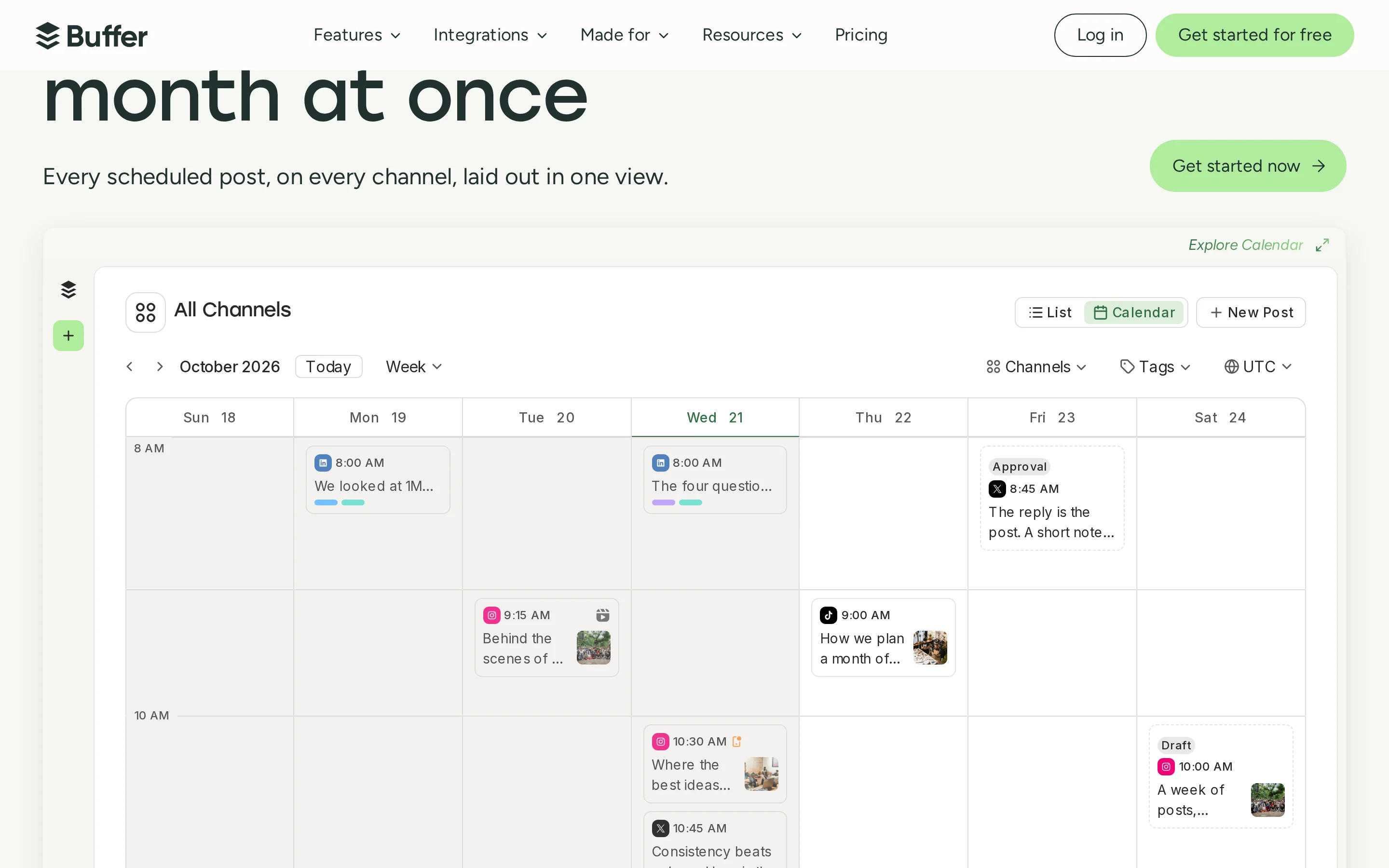
| Visual Content Calendar | Planning social campaigns | — None | ✓ Native | buffer |
| Enterprise SSO | Security compliance | ✓ Native | — None | mailchimp |
Technical deep dives
Architectural comparisons derived from live platform testing.
 Full resolution
  Full resolution
 Core Automation Engine: Lifecycle Email Sequencing vs. Social Content Scheduling
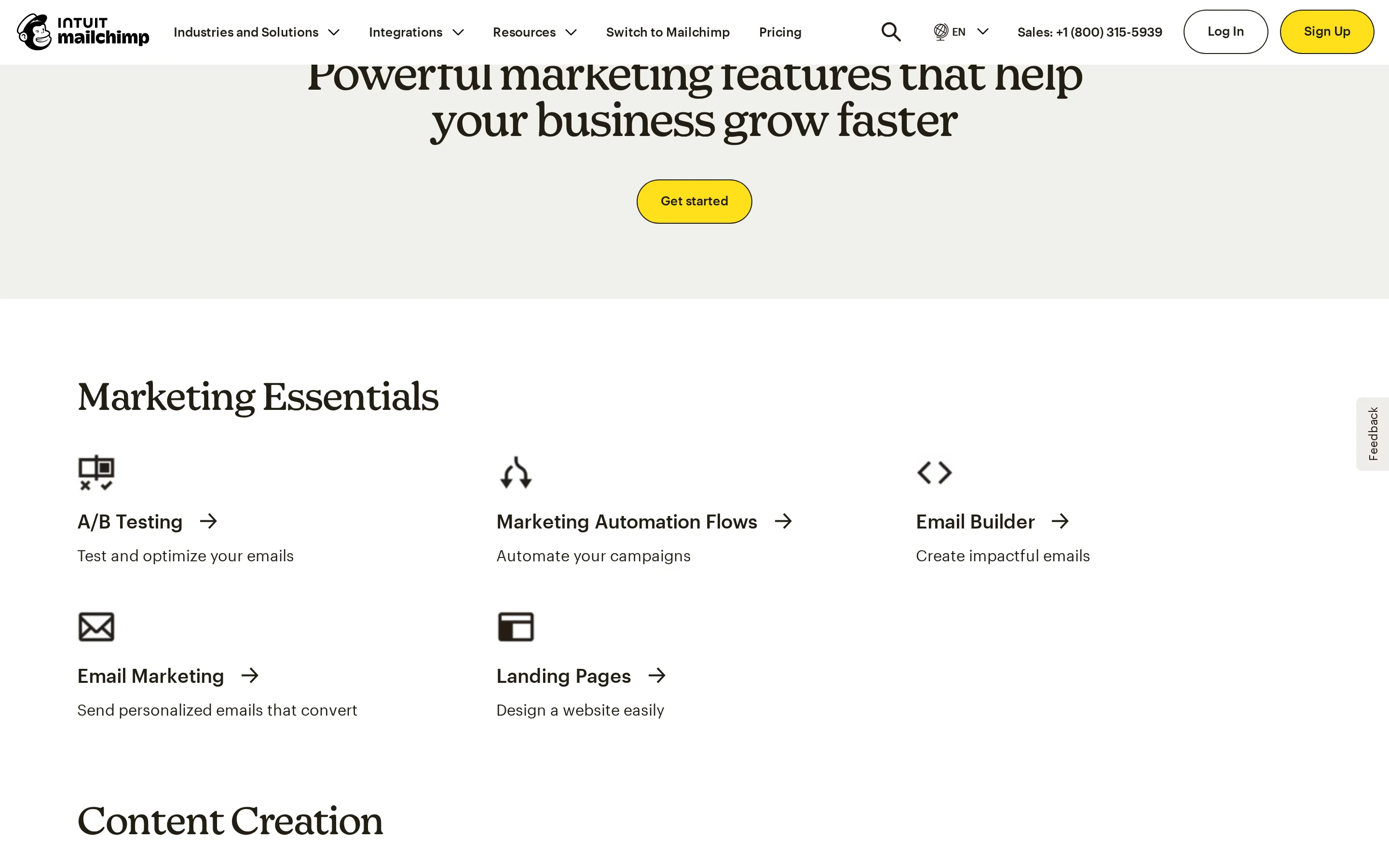
MailChimp’s architecture is fundamentally designed for trigger-based, multi-step email journeys. It supports complex conditional logic such as abandoned cart sequences, welcome series, and win-back campaigns that react to specific user behaviors (e.g., opening an email, clicking a link, or making a purchase). In contrast, Buffer’s automation is strictly time-based queue management for social posts. It lacks native CRM-driven behavioral triggers, meaning it cannot automatically send a message based on a lead’s interaction with your website or previous purchases.
Operationally, this means MailChimp allows sales teams to nurture leads through a funnel using personalized content delivered at optimal times determined by predictive analytics. Buffer, however, focuses on maintaining a consistent posting schedule across social networks. While Buffer has 'Ideas' and AI assistance for content creation, its execution engine does not support dynamic branching paths or real-time response to lead signals, limiting its utility for direct outbound sales automation.
For B2B sales automation, MailChimp is the clear winner. Its ability to segment audiences based on behavior and deliver targeted email sequences directly influences revenue attribution. Buffer serves a complementary role in brand awareness but cannot function as a primary outbound lead nurturing tool due to its lack of behavioral trigger capabilities.
Data Model & Audience Segmentation: Unified Contact Records vs. Channel-Centric Metrics
MailChimp maintains a single source of truth for customer identity across all channels. This unified contact record enables cross-channel personalization and sophisticated RFM (Recency, Frequency, Monetary) segmentation. Sales teams can view a complete history of a prospect’s interactions, including email opens, clicks, and e-commerce transactions, allowing for highly targeted outreach. Buffer, conversely, isolates data by social network. It tracks metrics like impressions and engagement per channel but does not consolidate these into a unified customer profile.
In daily operations, MailChimp’s segmentation allows marketers to create hyper-specific lists (e.g., 'Users who viewed pricing page but did not buy') and launch automated flows tailored to those segments. Buffer’s team collaboration features allow multiple users to manage content, but they do not share a unified audience view. Consequently, you cannot perform cross-platform lead scoring or identify a single individual across LinkedIn, Twitter, and Facebook within Buffer’s interface.
The tradeoff is clear: MailChimp provides the deep data granularity required for effective sales automation and lead prioritization. Buffer’s channel-centric model is sufficient for social media managers focused on content distribution but fails to provide the holistic customer view necessary for complex B2B outbound strategies.
Integration Topology: Deep CRM/Commerce Sync vs. API-Limited Publishing Bridges
MailChimp offers native, two-way syncs with major CRMs (Salesforce, HubSpot) and e-commerce platforms (Shopify, WooCommerce). These integrations drive sales automation directly from transactional data, ensuring that changes in a lead’s status in the CRM immediately update their journey in MailChimp. Buffer relies on basic API keys and third-party connectors primarily for content distribution. While it integrates with tools like Canva and Google Drive for asset management, it lacks deep bidirectional syncs with sales systems.
From an extensibility perspective, MailChimp’s ecosystem includes over 240+ apps, enabling complex workflows where email actions trigger CRM updates or vice versa. Buffer’s integration list is smaller (24 apps listed), focusing on design and automation platforms like n8n or Power Automate. However, these are often used to push content *to* Buffer rather than pulling rich customer data *from* Buffer for sales analysis.
For sales automation, MailChimp’s integration topology is vastly superior. It ensures data hygiene and real-time synchronization between marketing efforts and sales pipelines. Buffer’s limited API structure makes it difficult to attribute social engagement to closed-won deals, rendering it less effective for measuring the direct ROI of outbound campaigns.
Pricing & true cost
Published tier structures, credit scaling mechanics, and total outbound cost.
 Full resolution
 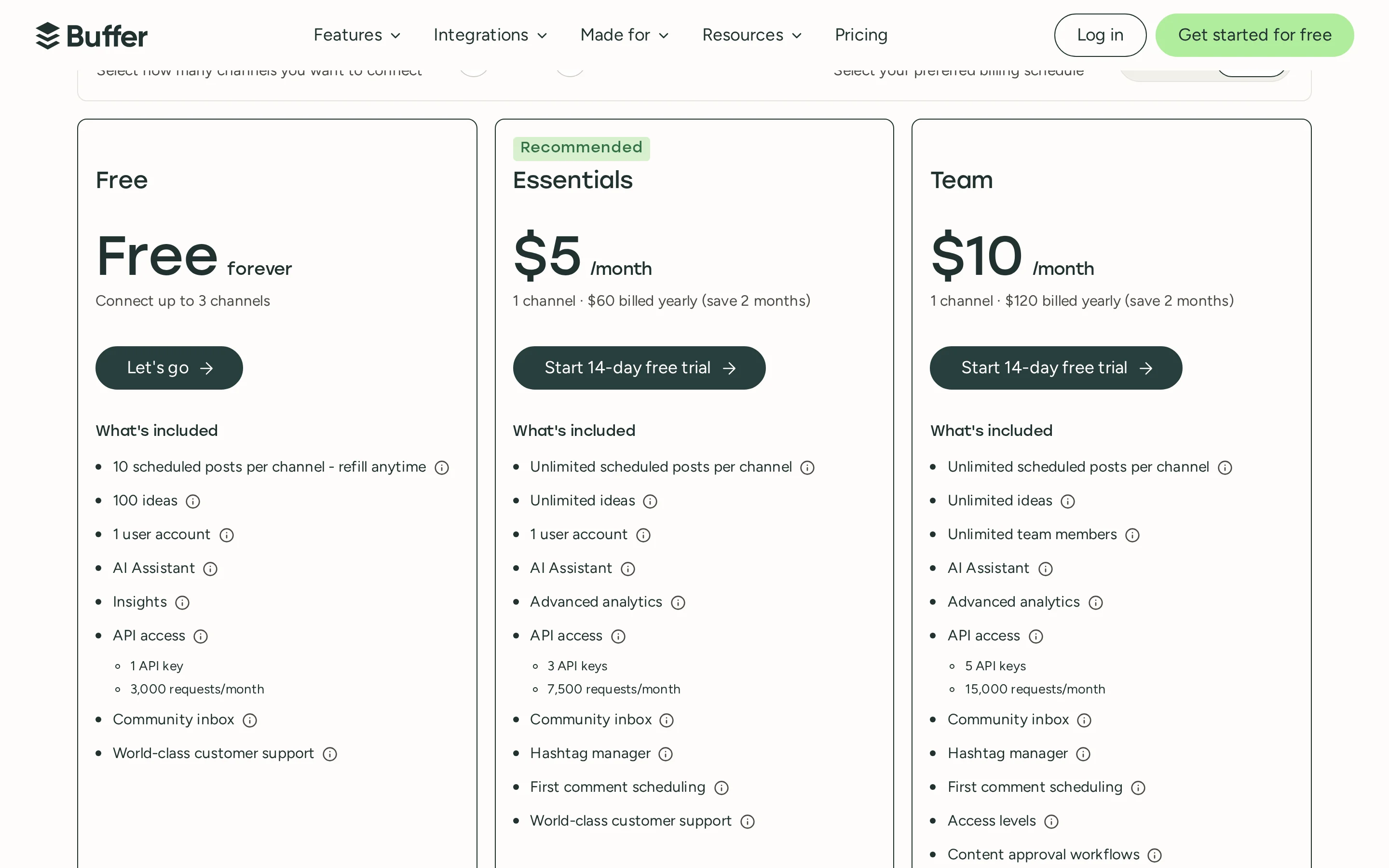 Full resolution
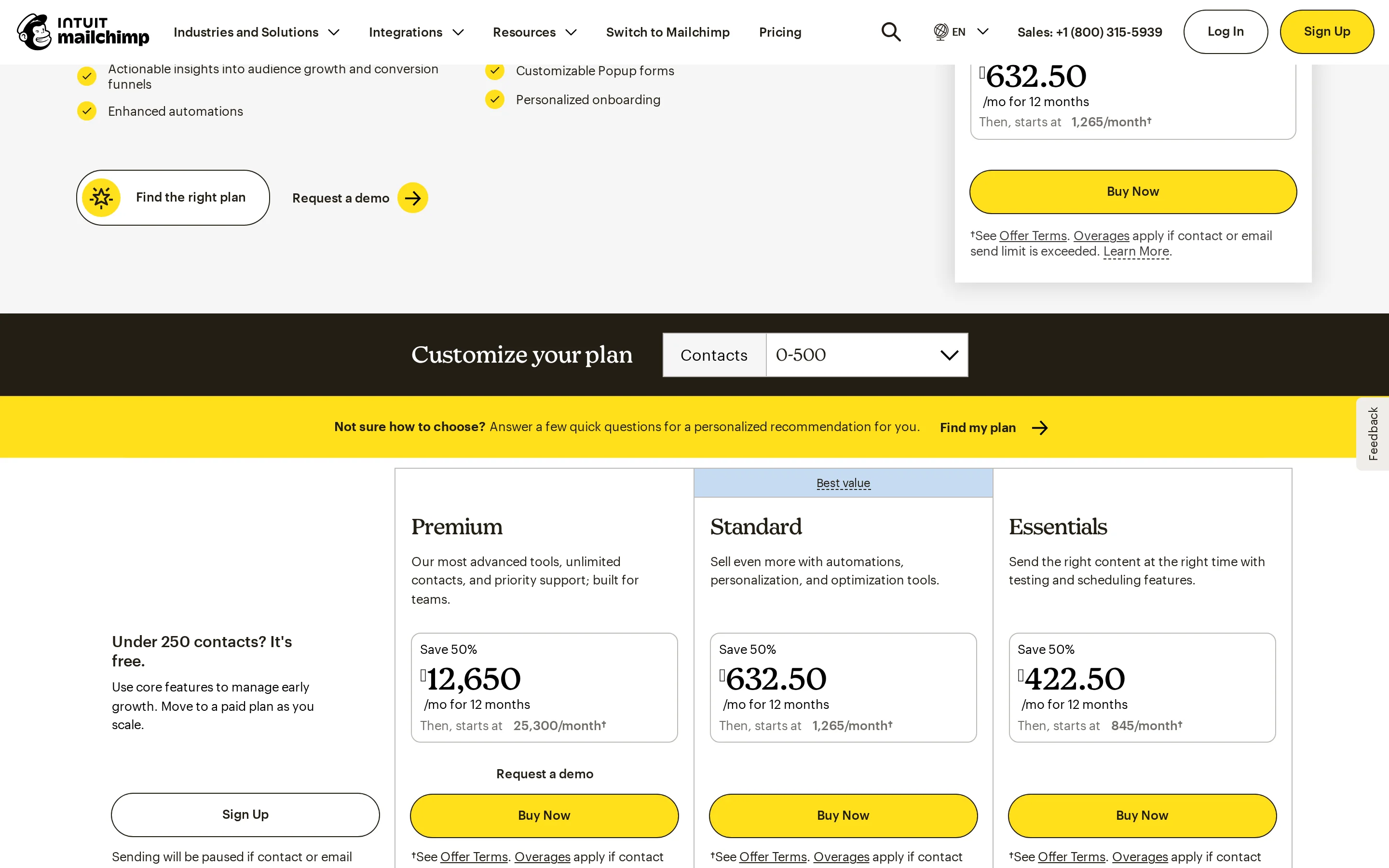
 MailChimp plans
- Free: $0/mo (Up to 250 contacts, 500 sends/mo)
- Essentials: Starts at ~$13/mo (varies by contacts, 10x contacts sends)
- Standard: Starts at ~$20/mo (varies by contacts, 12x contacts sends, 5 seats)
- Premium: Custom Pricing (Contact Sales for >150k contacts, unlimited seats)
Buffer plans
- Free: $0/mo (3 channels, 10 scheduled posts/channel)
- Essentials: $5/mo per channel (Unlimited posts, 1 user)
- Team: $10/mo per channel (Unlimited posts, Unlimited users)
MailChimp uses a hybrid pricing model based on contact count and feature tier, which can become expensive as your database grows. For example, scaling to 10,000 contacts on the Standard plan significantly increases monthly costs compared to the base rate. Buffer employs a simple per-channel subscription model, making it extremely predictable and affordable for small teams. However, Buffer’s low cost reflects its narrower functionality; it does not offer the robust email infrastructure or CRM connectivity that justifies MailChimp’s higher price point for serious outbound sales operations.
of Ownership Analysis
For a 5-person sales team needing 10,000 verified leads per month:
MailChimp: To handle 10,000 contacts, you would likely need the Standard plan. Assuming a mid-tier contact bracket, costs could range from $90-$150/mo depending on exact volume tiers. Add-ons for SMS or extra seats may apply. Total estimated annual cost: ~$1,200 - $1,800.
Buffer: If the team manages 5 social channels, the Team plan costs $10/mo per channel = $50/mo total. However, Buffer cannot process 'leads' in the traditional sense. If you use Buffer alongside a separate email tool, you must add that cost. Buffer alone is insufficient for lead gen. Total estimated annual cost for Buffer only: $600.
Verdict: MailChimp is more expensive but provides the necessary infrastructure for lead nurturing. Buffer is cheaper but requires additional tools to achieve comparable sales outcomes.
Which fits your outbound model?
Match your team size, deal complexity, and lead volume to the right engine.
High-Volume Cold Outbound
MailChimp is built for sending large volumes of personalized emails with advanced segmentation and deliverability controls. Buffer has no cold email capability.
Bulk List Cleaning & Hygiene
MailChimp offers built-in tools to clean lists and remove inactive subscribers. Buffer does not manage email lists.
Developer API Data Pipelines
Buffer offers simpler API access for social publishing tasks. MailChimp’s API is powerful but complex due to its extensive feature set.
Social Media Brand Awareness
Buffer excels at scheduling and managing social content across multiple platforms. MailChimp’s social features are secondary to its email core.
Where each platform falls short
Constructive limitations and architectural trade-offs to weigh before signing.
Where MailChimp falls short
- Pricing scales rapidly with contact list size, potentially becoming costly for large databases.
- Interface can be overwhelming for new users due to the breadth of features.
- Strict sending limits on lower-tier plans require upgrades for high-volume campaigns.
Where Buffer falls short
- No native email marketing or CRM capabilities; purely a social scheduler.
- Limited integration depth with sales tools; cannot track lead-to-revenue attribution.
- Free plan restricts to only 3 channels and 10 posts per channel, limiting scalability.
The switching playbook
What you gain and give up when migrating across platforms.
- Access to unified customer data and CRM integrations.
- Ability to run complex, behavior-triggered email automations.
- Higher volume sending capabilities for direct outreach.
- Significantly lower operational costs for small teams.
- Streamlined workflow for social media content planning and scheduling.
- Easier setup for non-technical users focused solely on social presence.
Frequently asked questions
Direct technical answers about MailChimp and Buffer.
Which platform has better data accuracy?
MailChimp provides higher data accuracy for sales purposes because it consolidates customer interactions across email, web, and commerce into a single profile. Buffer’s data is accurate for social metrics but fragmented across channels.
How do their starting costs compare?
Both offer free plans. MailChimp’s free plan supports up to 250 contacts. Buffer’s free plan supports 3 social channels. Paid plans start at approximately $13/mo for MailChimp (Essentials) and $5/mo per channel for Buffer (Essentials).
Can I connect unlimited mailboxes?
MailChimp connects to unlimited contacts and users on Premium plans, but mailbox connections are typically managed via SMTP settings or integrations. Buffer does not connect to email mailboxes at all; it connects to social media accounts.
Which tool is easier to learn?
Buffer is generally easier to learn due to its narrow focus on social scheduling. MailChimp has a steeper learning curve because of its extensive automation, segmentation, and reporting features.
Does MailChimp replace a CRM?
No, MailChimp is a marketing automation platform. It integrates with CRMs like Salesforce and HubSpot but does not replace them for full sales pipeline management.
Can Buffer help with lead generation?
Buffer helps generate leads indirectly by driving traffic to landing pages via social posts. It does not have native lead capture forms or email collection features like MailChimp.
Sources & methodology
Every claim is grounded in official vendor documentation and live audits.
Compare with sendroAI
See how sendroAI replaces manual research, credit limits, and deliverability traps with full autonomous execution.